
Managers get answers in seconds, not days.
The question goes straight to the data, so the number arrives while the moment to act is still open.
Product fact
Use case
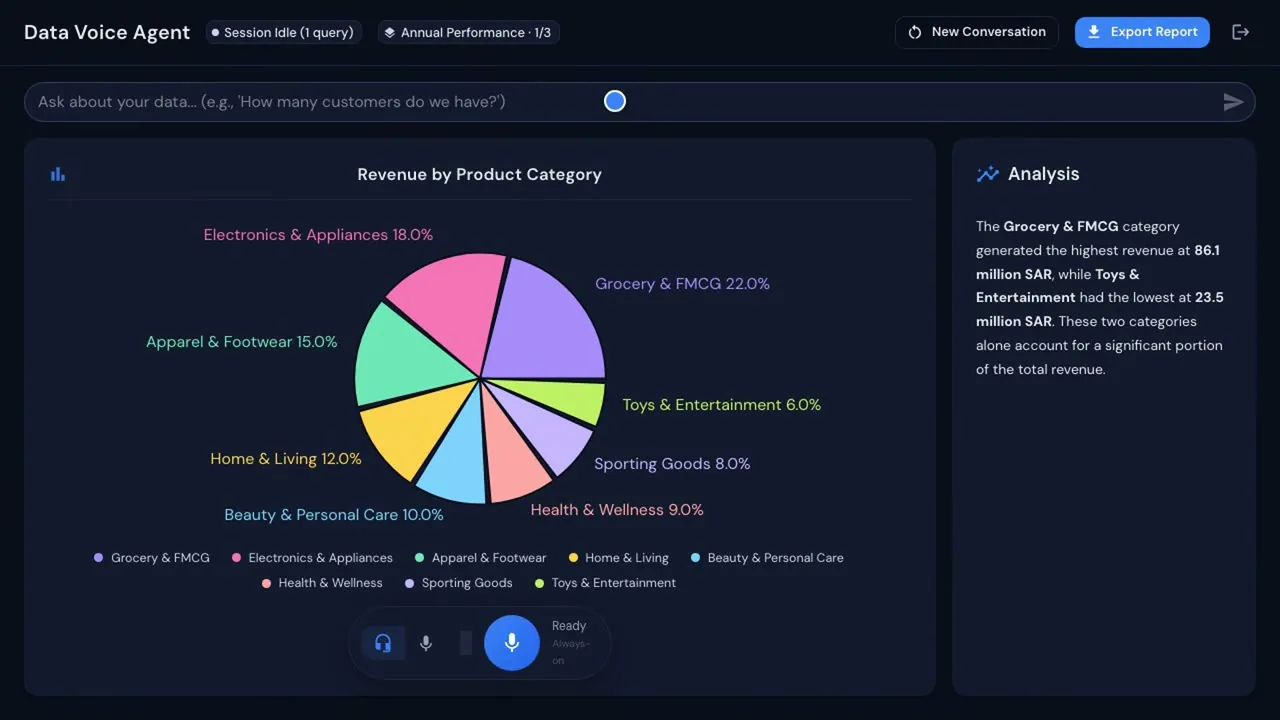
Data & Finance Voice Agent answers by voice or text, with the chart and written analysis behind every reply.
The problem today
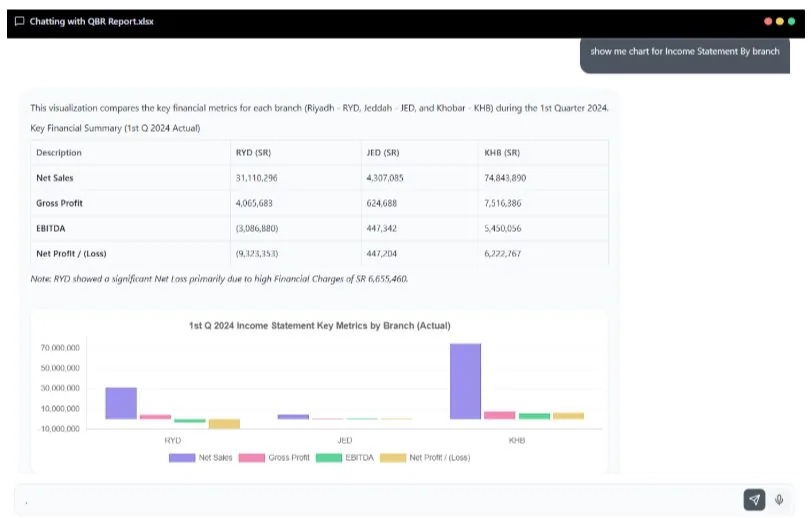
A manager wants net profit by branch for last quarter. The data sits in workbooks from Riyadh, Jeddah and Khobar, so the request goes to finance, waits its turn and comes back after the meeting.
How it works today
How it works
Connect the systems you already use (SAP, Oracle, Google Sheets, OneDrive, a live database or Xero), or upload an Excel workbook.
Excel · CSV · Your systemsNo new place to keep your data.
Ask the question the way you would ask a colleague, by voice or by text.
Voice · TextA manager does not need to learn a tool.
The agent answers with a chart, a written analysis and a spoken answer.
Chart · Analysis · Spoken answerEvery reply carries the chart behind it.
Multi-sheet workbooks are detected automatically, and follow-up questions keep the thread.
Multi-sheet · Follow-upsAsk again without starting over.
Export the answer to a report in one click.
One-click reportThe answer is ready to share.
The product
Products involved
Runs it
Ask your data by voice or text. Get the answer.
This agent answers the question you ask, by voice or text. Where a connection you need is not available out of the box, Custom Development & Integration builds it.
Connects to the systems you run
 SAP
SAP Oracle
 OneDrive
 Excel
ExcelWhat changes
The question goes straight to the data, so the number arrives while the moment to act is still open.
Product fact
The answer is built only from your own connected data and is shown with the chart it came from.
Product fact
The answer and the chart arrive without a request in the queue, so analysts spend their week on the analysis instead of the hunt for data.
Product fact
Questions
Questions about the data you connect, for example net profit by branch for last quarter. The reply comes back with a chart and a written analysis, and follow-up questions keep the thread. Upload an Excel workbook and multi-sheet workbooks are detected automatically.
Yes. The agent works in Arabic and English, by voice or by text.
The Data & Finance Voice Agent answers the question you ask, by voice or text. Data Insight builds live dashboards and writes the management report.
On a Saudi cloud provider in KSA, in your own cloud account, or on-premise, with your own AI key. Its speech works like the AI Voice Agent's: voice processing uses a third-party speech service by default, and can run in KSA or on your servers on request.
One-time cost. No monthly subscription and unlimited users, so adding a manager adds no fee. AI model usage runs on your own account.