
A manager wants last quarter's net profit by branch. The figures sit in workbooks and systems. The request goes to finance, waits in a queue and comes back after the meeting.
DATA & FINANCE VOICE AGENT
Ask your numbers. Hear the answer.
Connect the files and systems you already run. Then ask by voice or text and get the answer, with the chart and the written analysis behind it.
- Voice or text
- Arabic and English
- Your own data
- Cloud or on-premise
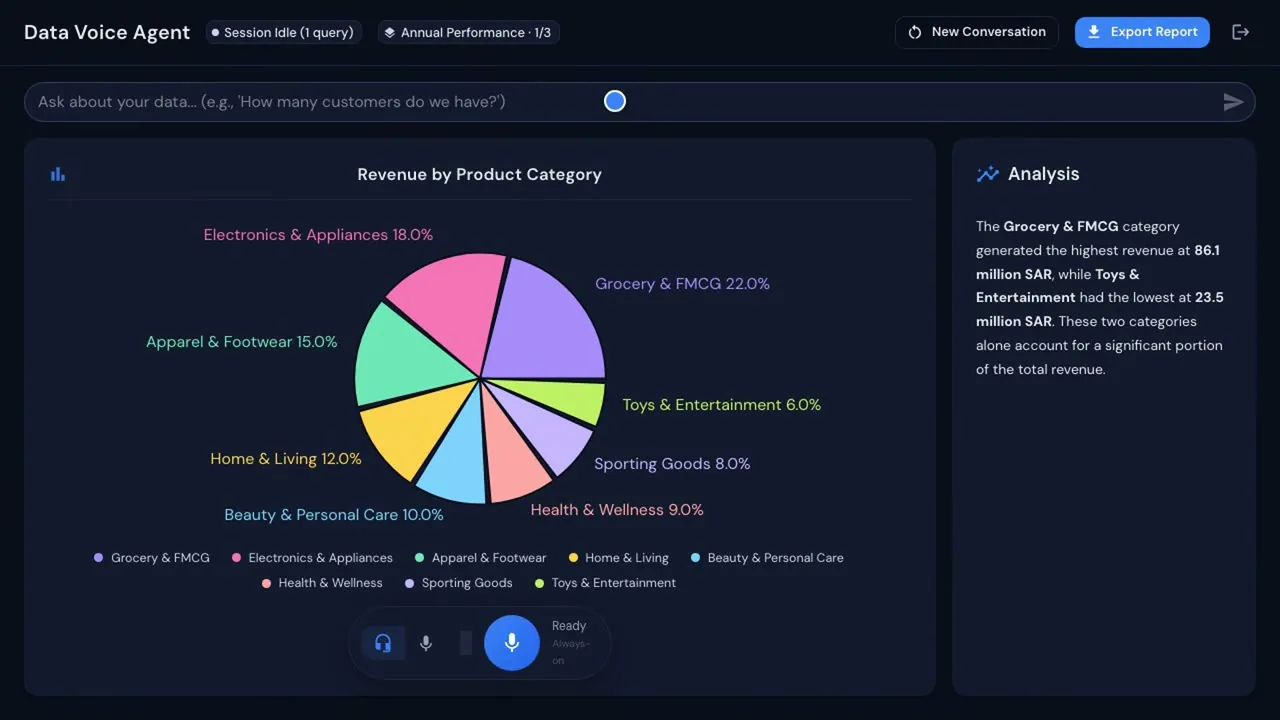
Frame from the demo. Sample data.
2
ways to ask: by voice or by text
3
parts to every answer: chart, written analysis, spoken reply
1
click to export the report
THE WORK IT TAKES OVER
Stop waiting in the queue for a number.
After
The manager asks out loud, or types. The answer arrives in seconds, with the chart and the written analysis behind it.
Analysts spend their week analysing, not hunting for data.
HOW IT WORKS
Connect. Ask. Check.
Four steps from your files to an answer you can verify.
-
Connect your data.
Upload an Excel workbook, or connect the systems you already run: SAP, Oracle, Google Sheets, OneDrive, a live database or Xero.
-
Ask by voice or text.
"Which region is driving our revenue?" Speak the question or type it. Multi-sheet workbooks are detected automatically.
-
Read, see and hear the answer.
A chart, a written analysis and a spoken reply arrive together. Follow-up questions keep the thread, so the next question builds on the last.
-
Check it, then share it.
Every reply is built only from your connected data and shown with the chart it came from. Export the report in one click.
CAPABILITIES
What it does with every question.
Ask by voice or by text.
Speak the question or type it into the bar. Use whichever suits the moment.
Chart, written analysis and spoken reply.
One question returns the chart, a plain-language explanation and an answer you can hear.
Multi-sheet workbooks, detected automatically.
Point it at a workbook with several sheets and it works out how they fit together.
Follow-up questions keep the thread.
Ask "and how is it trending year over year?" and it carries on from the last answer.
One-click export to report.
Take the answer, the charts and the analysis out as a report your team can share.
OUTCOMES
What changes.
Decisions stop queuing.
Anyone can ask across every connected source without raising a ticket, so the number arrives while the moment to act is still open.
Analysts move from fetching to analysing.
The answer and the chart arrive in seconds, so analysts spend their week on the analysis instead of the hunt for data.
Numbers you can check.
Every answer is built only from your own connected data and shown with the chart it came from, so anyone can verify it.
USE CASES
Where teams use it.
-
Finance & Accounts
Ask your numbers a question and hear the answer.
Ask by voice or text, and get a spoken answer with the chart and written analysis behind it.
- Primary product: Data & Finance Voice Agent
- Also: Knowledge Hub
Industries: All industries
-
Operations & Delivery
See the health of every project and the whole portfolio on one screen.
Budget, time and resources roll up from the task to the boardroom, with red, amber and green health.
- Primary product: Project & Portfolio Management
- Also: ERP Pro
- Also: Data & Finance Voice Agent
Industries: Contracting & Government suppliers · Professional & IT services
-
Finance & Accounts
Run quote-to-cash with ZATCA-ready invoices
From quote to order to delivery to invoice without retyping, with ZATCA-ready invoicing.
- Primary product: ERP Pro
- Also: ServiceDeskPro
- Also: Data & Finance Voice Agent
Industries: Trading & Distribution
-
Customer Service
Review every customer call without listening to any of them
Every call is recorded, transcribed and scored, so a manager listens only to the ones that matter.
- Primary product: AI Voice Agent
- Also: Data & Finance Voice Agent
Industries: Restaurants & F&B · Trading & Distribution · Professional & IT services
-
Finance & Accounts
Close the month across every company in the group
Combine multi-company books on one chart of accounts, and ask questions across the group by voice or text.
- Primary product: ERP Pro
- Also: Data & Finance Voice Agent
Industries: Trading & Distribution · Contracting & Government suppliers
-
Finance & Accounts
Answer "has my payment arrived?" calls and log promises to pay
The agent states the invoice status from your records and logs each promise to pay with its date.
- Primary product: AI Voice Agent
- Also: ERP Pro
- Also: Data & Finance Voice Agent
Industries: Trading & Distribution · Professional & IT services
WORKS WITH
Your data, wherever it already lives.
The agent reads the files and systems you connect. It does not ask you to move your data first.
Sources
Data & Finance Voice Agent
Answer (chart, analysis, voice)
Connected sources: SAP · Oracle · Google Sheets · OneDrive · a live database · Xero · Excel workbooks.
Project & Portfolio Management
Ask portfolio and budget questions of PPM data. Connected as integration work under Custom Development & Integration.
ERP Pro
Ask questions of your books. Connected as integration work under Custom Development & Integration.
Knowledge Hub
The same hub answers questions from documents, where this agent answers from numbers.
Connects to
 SAP
SAP Oracle
 OneDrive
 Excel
Excel
Trademarks belong to their owners. Shown to describe the systems we connect to, not partnerships.
Connections between AI Hub products are set up as integration work under Custom Development & Integration, not built in.
WHO IT IS FOR
Built for the people who need the number.
Finance leaders, managers and analysts, and any manager who raises a ticket to get a number.
OWN IT
On your servers or in the cloud. With the AI model you choose.
The agent answers from your data. You decide where it runs and which AI model sits behind it.
Cloud
On a Saudi cloud provider in KSA, or in your own cloud account. AI Hub can run it for you.
On-premise
Run it on your own servers, behind your own firewall.
Voice processing uses a third-party speech service by default, and can run in KSA or on your servers on request.
Your data stays where you decide.
On a Saudi cloud provider in KSA or on your servers in KSA, your data stays in KSA.
Bring your own AI model or key.
Use your own model or key and change it later. No lock-in.
Built on your systems of record.
The answer comes from the files and systems you connect, not from ours.
- Every answer is built from your connected data and shown with its chart, so it can be checked.
- Role-based access and audit trail.
- Control who can use it with role-based access and an audit trail.
One-time cost · No monthly subscription · Unlimited users.
Questions
Answers, in plain words.
Only from the data you connect: an uploaded workbook, or the systems you link. Every reply is shown with the chart it came from, so you can check it. It reads connected systems in read-only mode.
Everyone on your team. It is a one-time cost with unlimited users, so more people asking costs nothing extra.
Yes. Arabic questions work, by voice or text, as do English ones.
It reads Excel workbooks, including workbooks with several sheets, and connects to SAP, Oracle, Google Sheets, OneDrive, a live database and Xero.
You choose: Cloud, on a Saudi cloud provider in KSA or in your own cloud account, or on-premise, on your own servers. You can bring your own AI model or key and change it later.
One-time cost, no monthly subscription and unlimited users. AI model usage is billed on your own account with your model provider. We quote after a short conversation about your data sources and deployment.
Related agents