
Will callers know it is an AI?
That is your call. You write the greeting, and we suggest it says so.
AI Voice Agent
The AI Voice Agent answers your business line around the clock. It books, resolves or takes a message on every call, then gives your team a recorded, transcribed, sentiment-scored record of the conversation.
24/7
coverage, including nights, weekends and holidays
2
languages detected instantly: Arabic and English
6
industry templates with built-in guardrails
Hear it
One sample call, start to finish. Press play and read along.
Sample call from the AI Voice Agent demo.
0:32 · Read along as each line is spoken.
How it fits
Calls come in on the channels your customers use. The result goes to the systems your team works in.
Channels in
AI Voice Agent
RecordedTranscribedAudit-logged
Systems out
Your systems stay where they are. The agent works in front of them.
Before you book
That is your call. You write the greeting, and we suggest it says so.
It takes a message, logs a ticket or hands over to your team. The transcript goes with it.
No. It takes the calls nobody can: after hours, overflow and the same questions all day.
How it works
The AI Voice Agent is ready to configure, not a blank slate you have to engineer.
Choose from six templates. Each one comes with its instructions, capabilities and compliance rules pre-tuned. Choose a voice and give the agent a name.
Guardrails built inEach template knows what to say, and what never to say.
Upload your documents (opening hours, price lists, policies, help-desk guides) or connect the places they already live: SAP, Oracle, OneDrive, Google Drive and more.
Answers from your materialHours, prices, policies and guides, all in one place.
Phone lines, WhatsApp and a website voice widget.
One agent, every channelCallers reach the same agent wherever they start.
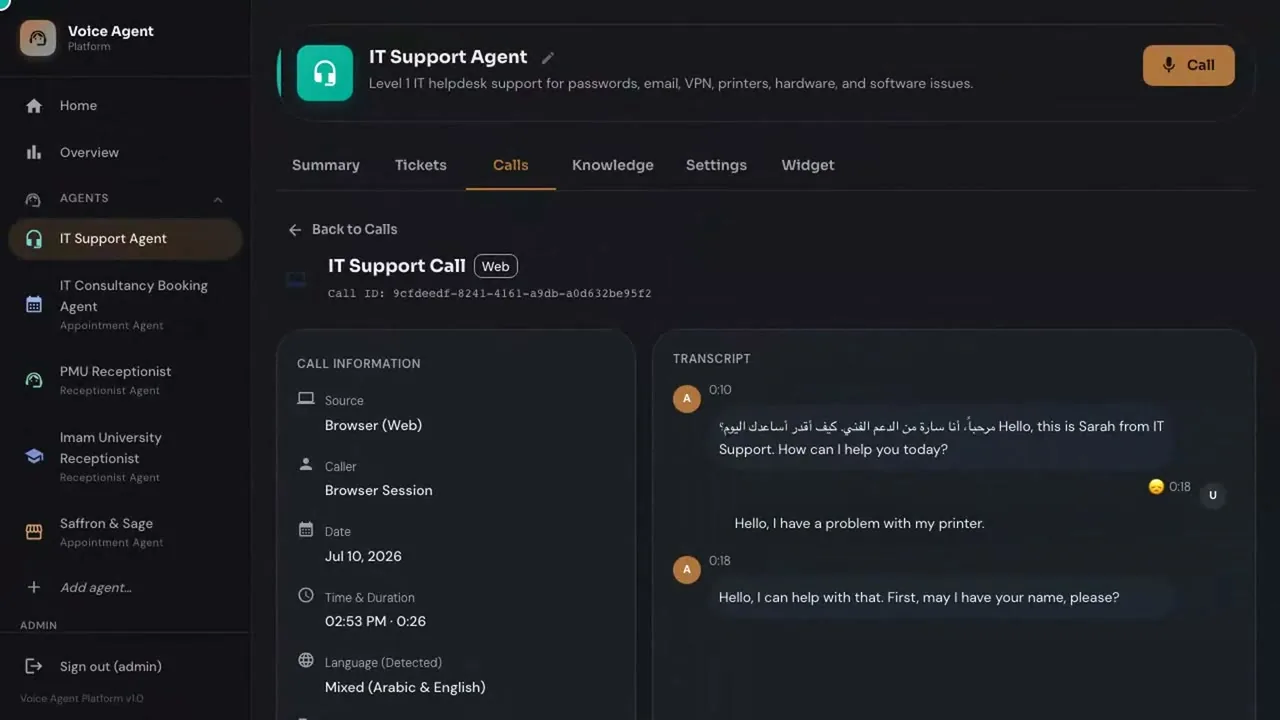
Watch calls live, read transcripts, listen back, check tickets and messages, and tune the agent. Every call is recorded and logged.
Every call recordedYou see exactly what your callers heard.
AI Hub configures it with you, connects it to the systems you run, and keeps it running.
What your team gets
Capabilities
Six jobs, done on the first ring.
Nights, weekends and holidays. The line is picked up on the first ring, so a missed call never quietly becomes a lost customer.
The caller speaks. The agent replies in the same language and can switch language mid-call. No menu, no waiting for a bilingual colleague.
Calendar bookings (Google Calendar, Outlook / Microsoft 365), ticket creation and order taking, with the details confirmed back to the caller.
Answers questions from your own knowledge base: hours, prices, policies, procedures, troubleshooting steps. It looks up live data during the call, such as the status of an order, a booking or a ticket.
Reminders, follow-ups and confirmations.
Every call is recorded and transcribed, with a sentiment score per call, so managers see how calls actually went.
Arabic and English
In the Kingdom, one call can start in Arabic and finish in English. The AI Voice Agent detects the language the moment the caller speaks, and answers in kind.
No "press 1 for English, press 2 for Arabic". The agent hears and responds.
The call record logs the detected language, including calls that mix both (the demo shows "Mixed, Arabic and English").
After-hours and Arabic calls are the ones most often lost. This is where an AI Voice Agent pays back first.
Dialect coverage depends on the voice and model you choose. We will demonstrate your callers' dialect in the demo before you decide.
Industries
Four launch industries below, and six built-in templates for calls where a wrong word has a cost. The scenarios are illustrations of what the agent does, not customer stories.
Illustrative scenarios. Not customer stories.
Evening and rush-hour calls: "Is there a table for six tonight?" "When does the kitchen close?" "Is the dish nut-free?"
Answers from your menu and opening hours, takes the booking request, repeats back the details, and leaves the floor staff to serve. Pairs with RMS.
Saffron & Sage, the restaurant template
In this scenario, ten booking calls ring out on a busy Thursday and half of those callers would have booked, which is five bookings you never saw. Illustrative scenario, not a customer result.
"Where is my delivery?" "Can I get a quote?" "Can you resend the invoice?"
Answers from your knowledge base, takes a message with the order reference, and routes sales calls to your team. With an integration to ERP Pro it can answer order status from live data.
General Receptionist
Calls to the site office and head office: "Which documents do I need to register as a supplier?" "What is the status of our bid?"
Gives document requirements and contacts from your knowledge base, routes the call, and takes a message after hours. Pairs with Proposal Hub (supplier side, answering tenders) and Procurement Pro (buyer side, running them).
General Receptionist (the template names construction companies)
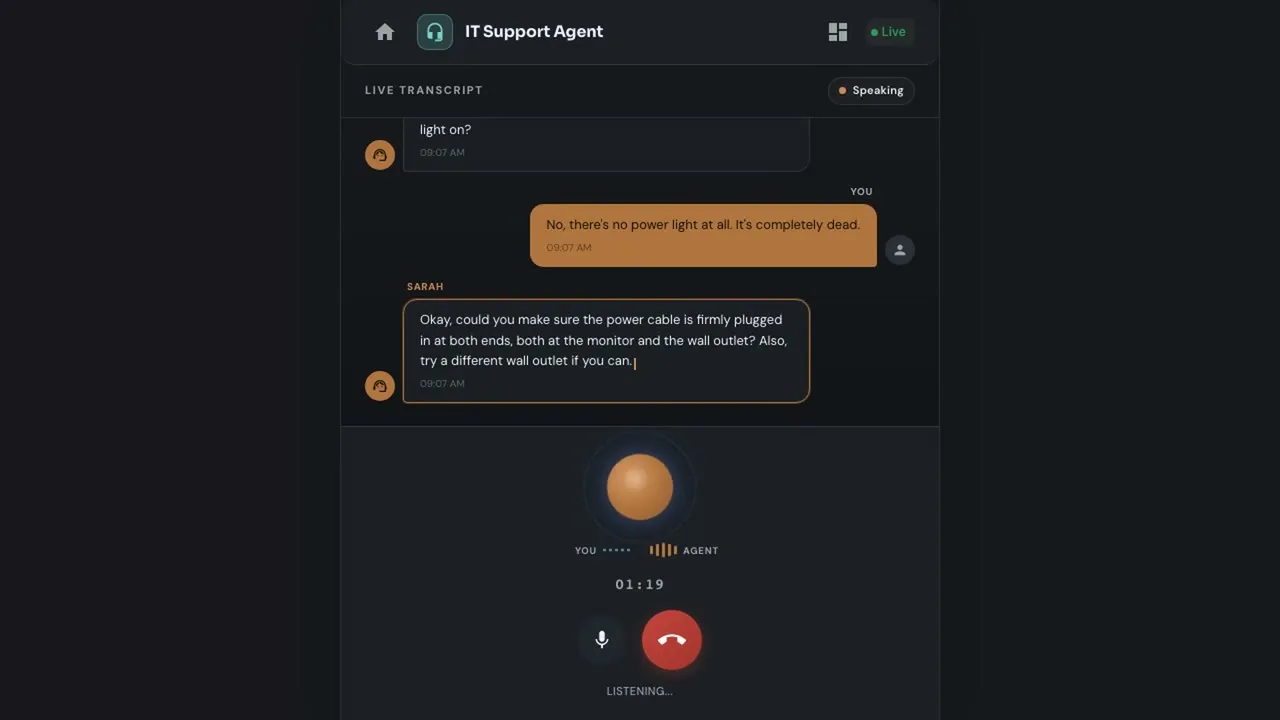
The support line, the booking line: "My monitor will not turn on." "Can I book a consultation?"
Level 1 help-desk support: troubleshooting, ticket creation and appointment booking. This is the demo itself. Pairs with ServiceDeskPro.
IT Support Agent, IT Consultancy Booking Agent (both shown in the demo)
Takes the support call, troubleshoots, opens a ticket with the recording and transcript.
Hands the call to a person when the case needs one.Appointments, department directory, visiting hours.
Recognises medical emergencies and escalates to 997.Bookings, opening hours, menu questions and orders.
Answers from your own menu and knowledge base.Order status, product and delivery questions.
Answers from your own knowledge base and live order data.Admissions, programmes, fees and the academic calendar.
Answers only from your uploaded knowledge base.Directs citizens to the right service, lists required documents, refers to official portals such as Absher and Tawakkalna.
Refers to official portals instead of improvising.Integrations and handoff
Calls come in from the channels your customers use. What the agent learns goes out to the systems your team works in.
CallTranscriptTicket
A phone call becomes a ticket, with the voice transcribed and the SLA clock already running.
An enquiry becomes a lead with an owner and a next action.
The same documents that answer your team's questions answer your callers'. The connection is integration work under Custom Development & Integration.
Set the rules: always for complaints, for certain topics, for a request to speak to a person, or when the agent is unsure.
The transcript, the caller's language and the ticket travel with the handoff. Nobody asks the caller to repeat themselves. Handoff is a live transfer or a callback with the transcript, as you configure.
In templates that need it, the agent directs the caller to the right emergency number straight away.
Upload documents directly, or connect OneDrive, Google Drive, SAP and Oracle sources so the agent answers from your own material.
Governance and safety
A voice agent speaks for your organisation. The AI Voice Agent is built so it knows what it must never say.
Account numbers, identity numbers and similar details are not repeated aloud.
Where a call signals an emergency, the agent sends the caller to the right number and flags your team.
Every template carries its own rules: what it may answer, what it must refer, what it must never do.
Who called, when, what was said, what the agent did. Reviewable by your team.
Decide who can listen to recordings, read transcripts and change the agent's settings. Role-based access and an audit trail apply to every product.
Rules you set decide what the agent may do on its own and what it passes to a person.
Recordings and transcripts are stored where you choose (see Deployment). You set retention.
Deployment
Call recordings are some of the most sensitive data a business holds. You decide where they live.
On a Saudi cloud provider in KSA, or in your own cloud account. AI Hub can run it for you. Recordings and transcripts: in KSA on a Saudi cloud provider, or in your cloud account.
Run it on your own servers, behind your own firewall. Recordings and transcripts: on your servers.
Voice processing uses a third-party speech service by default, and can run in KSA or on your servers on request.
Recordings and transcripts are stored where you choose: in KSA on a Saudi cloud provider or in your cloud account (Cloud), or on your servers (On-premise). The knowledge base lives in your environment. Voice processing can run in KSA or on your servers; the default uses a third-party speech service, configurable per client.
Use your own model or key. Change it later. No lock-in, no cost to walking away.
The agent works against your systems of record and your knowledge base, not ours.
One-time cost, no monthly subscription, unlimited users.
Watch the demo
88 seconds. An incoming call, an Arabic and English greeting, a fix, a ticket, and the setup behind it.
Questions
The agent detects Arabic or English the moment the caller speaks and replies in that language. Which dialects work best depends on the voice and model you choose, so we demonstrate your callers' dialect in the demo before you decide.
Yes. It makes outbound calls for reminders, follow-ups and confirmations, in Arabic or English.
It is built for them. Six templates ship with guardrails: sensitive details are never read back, emergencies escalate to the right number, and every call is recorded and audit-logged. Regulated calls still need a rollout plan that your compliance team signs off. We help you with that.
You choose: Cloud, on a Saudi cloud provider in KSA or in your own cloud account, or on-premise, on your own servers. There is no default storage location. On Cloud, recordings and transcripts are in KSA on a Saudi cloud provider, or in your cloud account; on-premise, they are on your servers. Voice processing can run in KSA or on your servers; the default uses a third-party speech service, set per client.
Yes. You can bring your own AI model or key and change it later. No lock-in.
One-time cost, no monthly subscription and unlimited users. We quote after a short conversation about your call volume, channels and deployment.
Yes. It works with AI Hub's ServiceDeskPro tickets, Sales Pro (CRM) leads and RMS orders and bookings, with Google Calendar and Outlook / Microsoft 365, and through an API with third-party CRM, ERP and helpdesk systems such as Salesforce, Dynamics 365, Zoho and Odoo.
Pairs well with