
Invoices arrive as PDFs, phone photos and paper, in Arabic, English or both. Someone retypes each one into a spreadsheet or the ERP, and handwritten delivery notes from site are the slowest.
DIGITAL PRO
Paper in. Clean records out.
Digital Pro reads invoices, receipts, delivery notes, business cards and handwritten notes, Arabic included. Your team checks the record instead of retyping it.
- Reads handwriting
- Reads Arabic
- Records go into your ERP
- Cloud or on-premise
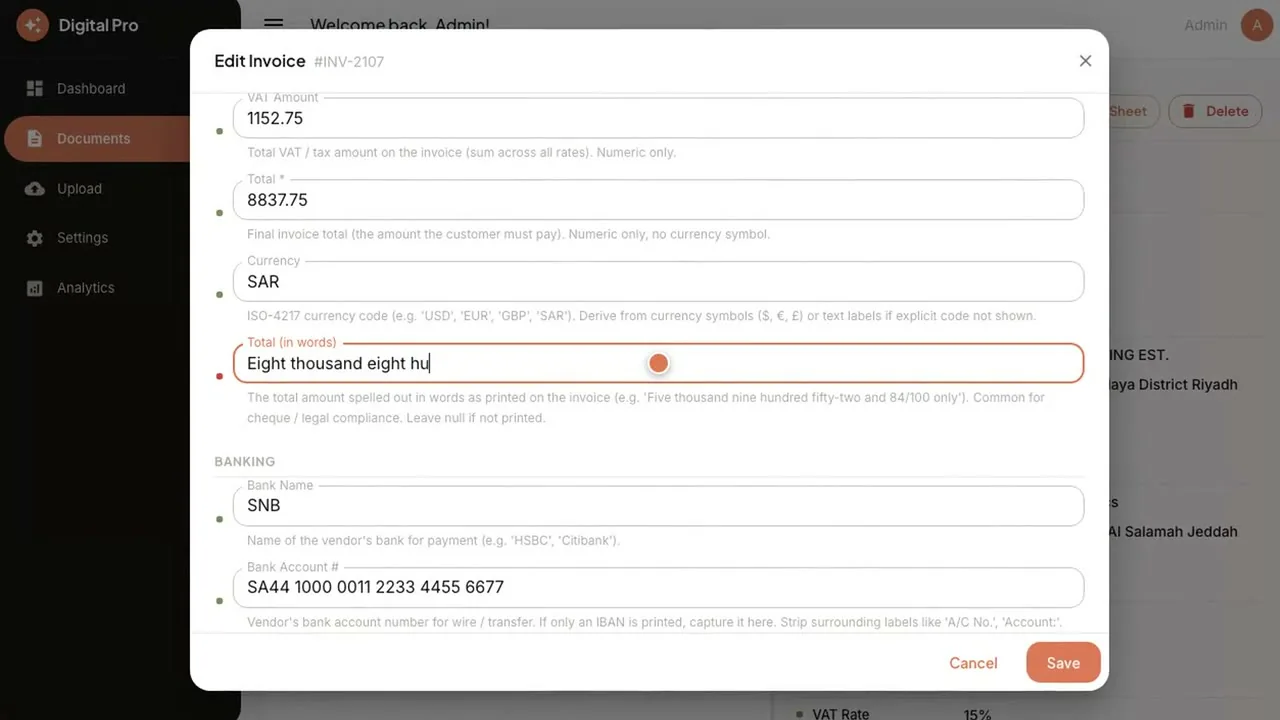
Frame from the demo. Sample data.
11
ready-made templates, or add your own
3
ways to capture: web, camera or message
4
ERPs reached through an API: ERP Pro, SAP, Odoo, Dynamics 365
THE WORK IT TAKES OVER
Stop retyping the paper your business runs on.
After
Documents are captured, read and filled in. Your team checks what is marked doubtful and approves the rest.
The paper stays paper. The data does not have to.
HOW IT WORKS
Capture. Read. Check. Send.
Four steps from a piece of paper to a record your accounts can use.
-
Capture it from anywhere.
Upload in the browser, take a photo with the camera, or send it on WhatsApp or Telegram. Multi-page documents are supported.
-
It reads the fields.
Digital Pro picks from eleven ready-made templates, or one you add, and reads the document, including handwriting and Arabic content.
-
Your team checks what is doubtful.
Confidence marks show which fields it is unsure of, and those documents wait in a review queue. A person edits and approves.
-
Send it on.
Export to Google Sheets in one click, or send the records straight into your ERP, CRM or document management system through an API. For ERPs: ERP Pro, SAP, Odoo or Dynamics 365.
CAPABILITIES
What it does with every document.
Capture by web, camera or message.
Upload a file, snap a photo or send it in a message. The document does not have to come to the office first.
Eleven templates, or add your own.
Invoices, receipts and more, each with the fields that matter for that document. Add a template for the paper that is specific to your business.
Reads handwriting and Arabic content.
Handwritten site notes and delivery notes, in English or Arabic, read into fields your team can check.
Confidence marks and a review queue.
Anything uncertain is marked and queued, so a person sees it before it reaches your books.
One-click export to your spreadsheet.
Send the checked records to a spreadsheet in one click, or into your ERP through an API.
OUTCOMES
What changes.
Records go straight into your ERP.
Extracted records are sent through an API into any ERP: ERP Pro, SAP, Odoo or Dynamics 365.
Errors stopped before the books.
Confidence marks and a needs-review queue put a person in front of anything uncertain, so keying errors never reach your accounts.
No lock-in by design.
Your server, your database, your own AI account and your own spreadsheet. One-time cost, and leaving costs nothing.
Illustrative scenario. 25 h → 5 h Typing becomes checking. In this scenario, 300 invoices a month at five minutes each is 25 hours of typing; the same batch reviewed at one minute each is five.
WATCH THE DEMO
Paper in. Data out.
Under two minutes. An invoice, a phone message, a handwritten note in Arabic and English, and the records in one list.
Sample data.
Watch all demosUSE CASES
Where teams use it.
-
Finance & Accounts
Read supplier invoices instead of retyping them
Invoices, receipts and delivery notes, including handwritten and Arabic ones, become records your team only checks.
- Primary product: Digital Pro
- Also: ERP Pro
Industries: All industries
-
Operations & Delivery
Prove every delivery with a signed photo on Telegram or WhatsApp.
The driver sends the signed photo, the code matches it to the note, and the system closes it and tells everyone.
- Primary product: ServiceDeskPro
- Also: ERP Pro
- Also: Digital Pro
Industries: Trading & Distribution
WORKS WITH
Your ERP stays where it is.
Digital Pro reads the paper and hands clean records to the system you already use.
Documents in (invoice, receipt, delivery note, business card, handwritten note)
Digital Pro
Records out (spreadsheet, ERP)
Records go into (through an API): ERP Pro · SAP · Odoo · Dynamics 365. Or export to your spreadsheet.
ERP Pro
Extracted invoices and receipts post to one set of books. Connected as integration work under Custom Development & Integration.
Data & Finance Voice Agent
Once the records are in, ask your numbers by voice or text.
Procurement Pro
Reads supplier documents and invoices into clean records.
ServiceDeskPro (Delivery Notes)
Delivery notes read from paper. Connected as integration work under Custom Development & Integration.
Connections between AI Hub products are set up as integration work under Custom Development & Integration, not built in.
WHO IT IS FOR
Built for every paper-heavy back office.
Accounts payable and back-office teams in any business that runs on paper.
OWN IT
Your server, your database, your own AI account.
Documents are some of the most sensitive records a business holds. You decide where they live and which AI model reads them.
Cloud
On a Saudi cloud provider in KSA, or in your own cloud account. AI Hub can run it for you.
On-premise
Run it on your own servers, behind your own firewall.
Your records stay where you decide.
On a Saudi cloud provider in KSA or on your servers in KSA, your data stays in KSA.
Bring your own AI account.
Use your own AI account and change it later. No lock-in, and leaving costs nothing.
Your database, your spreadsheet.
Extracted records live in your database and export to your spreadsheet.
- Confidence marks and a needs-review queue: a person approves anything uncertain before it reaches the books.
- Role-based access and audit trail.
- Send records to your ERP through an API, not by hand.
One-time cost · No monthly subscription · Unlimited users.
Questions
Answers, in plain words.
Invoices, receipts, delivery notes, business cards and handwritten notes. It comes with eleven ready-made templates, and you can add your own for the paper that is specific to your business.
Yes. Digital Pro reads handwriting and Arabic content. Fields it is unsure of are marked and queued, so a person checks anything uncertain.
Confidence marks show which fields it doubts, and those documents wait in a review queue. A person edits and approves before anything goes on to your books.
No. Digital Pro sends extracted records through an API into the ERP you already run, including ERP Pro, SAP, Odoo and Dynamics 365, or exports them to a spreadsheet in one click.
You choose: Cloud, on a Saudi cloud provider in KSA or in your own cloud account, or on-premise, on your own servers. It runs on your own AI account, and you can change it later.
One-time cost, no monthly subscription and unlimited users. AI model usage is billed on your own account with your model provider. We quote after a short conversation about your documents and deployment.
Related agents